Photos aren't deleted instantly. They go into a candidate queue first, then you confirm all at once before leaving.
Free core cleanup · No ads · No uploads
OnePhoto
A simpler way to clean your iPhone photo library. Swipe left to delete, right to keep, and review trip or daily photos like swiping cards — then confirm all at once.
Clean your library with clear, simple gestures.
OnePhoto keeps core cleanup outside the paywall and avoids complex rules. The current release focuses on the essentials: categorize, swipe, queue, and batch-confirm.
Don't want to deal with a photo? Swipe right and move on — nothing changes in your library.
Add photos to your favorites candidate list. Batch-confirm it together with deletions at the end.
The main cleanup flow is free. The one-time supporter unlock adds long-term stats, full cleanup queues, compression tools, and themes.
01
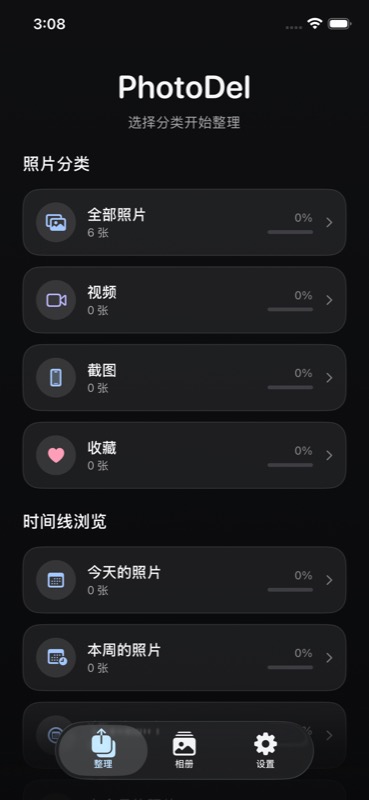
Choose a scope
Enter from All Photos, Videos, Screenshots, Favorites, or Timeline to focus on a specific set.
02
Swipe through each photo
Use swipe gestures or the bottom toolbar to undo, favorite, mark for deletion, or skip.
03
Confirm when done
The Done button in the bottom-right walks you through a confirmation flow, so you always know how to exit.
No photos leave your phone.
OnePhoto uses the iOS Photos framework to read and organize your library. All cleaning decisions, candidate lists, and batch operations happen on-device. No account needed, nothing uploaded to any server. Read the full privacy policy
Download on the App Store
OnePhoto's core cleanup features are free forever and completely ad-free. Advanced tools use a one-time unlock for long-term stats, full cleanup queues, compression tools, themes, and more.